
Billing and plans
Compare Free, Business and Enterprise, change your plan, manage seats and download invoices.
Billing & plan shows your current plan, your balance, your payment method and your invoices. Only workspace admins see it. It is open on every plan, so you can always upgrade from here.
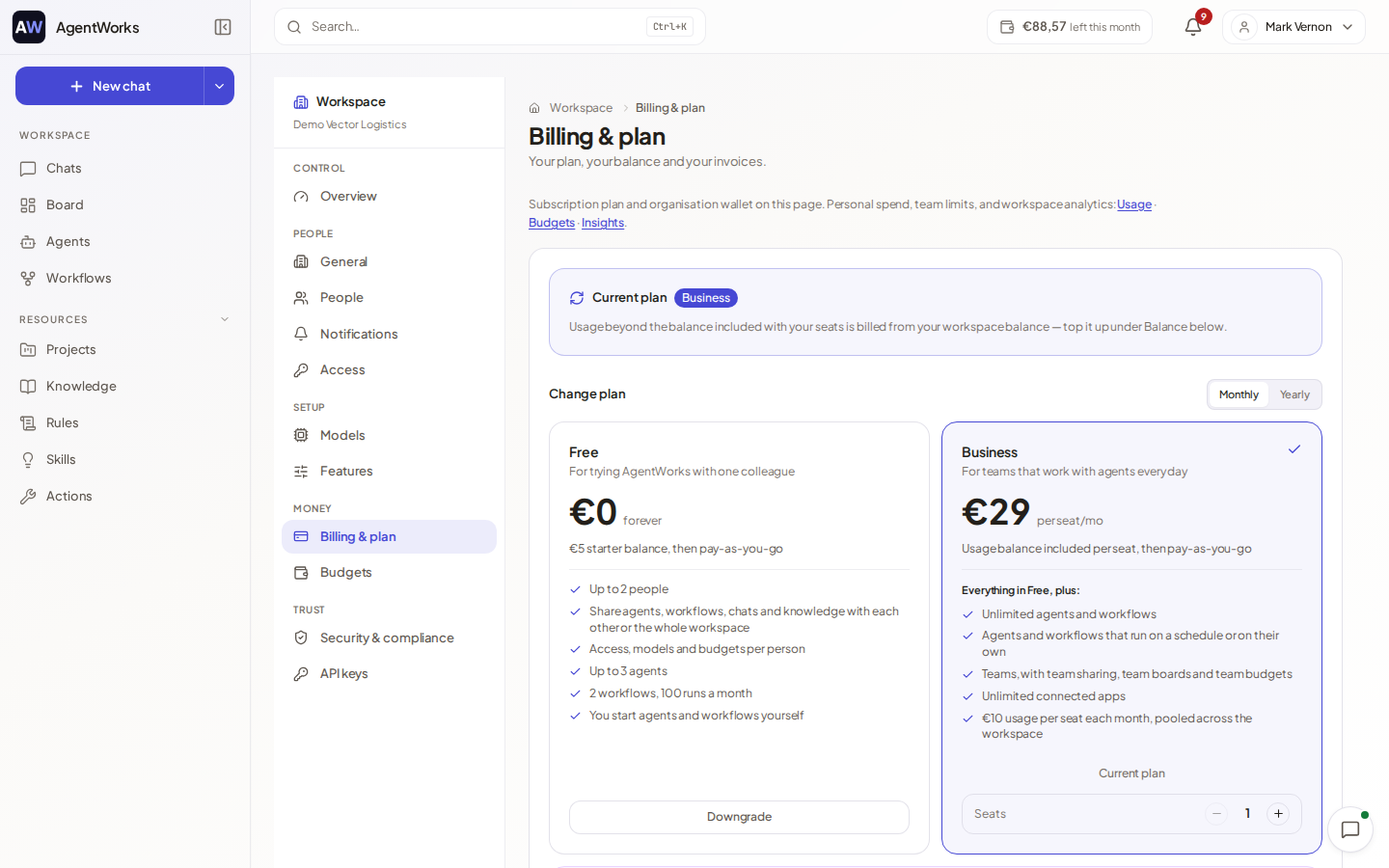
The plans
| Free | Business | Enterprise | |
|---|---|---|---|
| Price | €0 | €29 per seat per month, or €290 per seat per year | Custom pricing |
| Usage included | One-time €5 starter balance | €10 per seat each month, pooled across the workspace | Negotiated |
| People | For trying AgentWorks with one colleague | Per paid seat | Unlimited seats |
| Agents | Up to 3 | Unlimited | Unlimited |
| Workflows | Up to 2, with 100 runs a month | Unlimited, 10,000 runs a month | Unlimited |
| Schedules | No: you start agents and workflows yourself | Agents and workflows can run on a schedule or on their own | Included |
| Connected apps | Up to 4 | Unlimited | Unlimited |
| Teams and team sharing | No | Yes, with team boards and team budgets | Yes |
| Models | Free-tier models | All models | All models |
Beyond the table, Free includes 2 knowledge bases, 1 board with up to 10 open tasks, 3 projects and 2 Deep Research runs per 30 days. Business includes 15 Deep Research runs per person per 30 days. Business has no cap on knowledge bases or boards.
Enterprise adds unlimited seats, custom usage limits, SSO set up with your account manager, an SLA with priority support, and a dedicated account manager. Choose Contact sales to talk to us; Enterprise is not bought in the app.
Prices are per seat and charged in euros. Check Billing & plan for the figures that apply to you today.
Upgrade
Open Billing & plan
In the Workspace console, open Billing & plan and look at Change plan (Choose a plan if you are on Free).
Choose a plan and interval
Pick Monthly or Yearly and select Upgrade on Business. Set the number of seats with Increase seats and Decrease seats.
Confirm
The confirmation shows the price. An upgrade takes effect immediately, and the price difference is prorated onto your next invoice. Choose Confirm change.
You can also start a free trial of Business where one is offered: look for Start free 7-day trial. The trial lasts 7 days. A trial adds no balance and needs no card, and each workspace can use it once. When it ends the workspace returns to Free, and people added during the trial lose access until you move to a paid plan; their data stays.
Seats, downgrades and cancelling
- Seats. Each person who joins on Business takes a seat. Change the number with Update seats.
- Switch interval. Use Switch to yearly or Switch to monthly.
- Downgrade. A switch to a lower plan takes effect at the end of your current billing period, and you keep your features until then. Moving to Free asks who stays: Free has room for you and one colleague, and others lose access but keep their data. Your balance stays available.
- Cancel. Downgrade to Free: your plan stays active until the end of the billing period and any extra usage you topped up stays available. Manage subscription in Stripe opens the billing portal.
Payment method and invoices
Payment method holds the card used for subscriptions and top-ups, processed securely by Stripe. If a payment fails you see Payment failed with Update card.
Every card payment, whether a plan or a top-up, gets an invoice. Find it under Invoices and choose Download invoice. A monthly overview as a PDF is under Statements & invoices: opening and closing balance, top-ups and what was spent on chat, agents and automations.
If an agency manages your billing, this page says so and shows your usage; plan and payment questions go to the agency.