
Building AI Agent Pipelines on a Visual Canvas
By AgentWorks Team · AI agents for European teams
The team behind AgentWorks — building EU-compliant AI agents and multi-LLM workflows for European teams.
Reviewed July 6, 2026
TL;DR
The visual AI workflow builder lets you chain research, draft, review and publish steps on a no-code canvas. Each step is a logged agent with its own model and risk class, state-changing actions can require human approval, and every run is captured in an exportable audit trail. It's available on Pro and above, and can run on demand, on a schedule, or via webhook.
Most useful work isn't one prompt — it's a sequence. Research a topic, draft something from it, have it reviewed, then publish. The visual AI workflow builder lets you lay that sequence out on a canvas and run it, without writing code.
From single prompts to repeatable pipelines
A one-off chat is great for exploration, but it doesn't scale to work you do every week. The moment you find yourself copying an output from one conversation into the next, you have a pipeline hiding in plain sight — and pipelines belong on a canvas, not in your head.
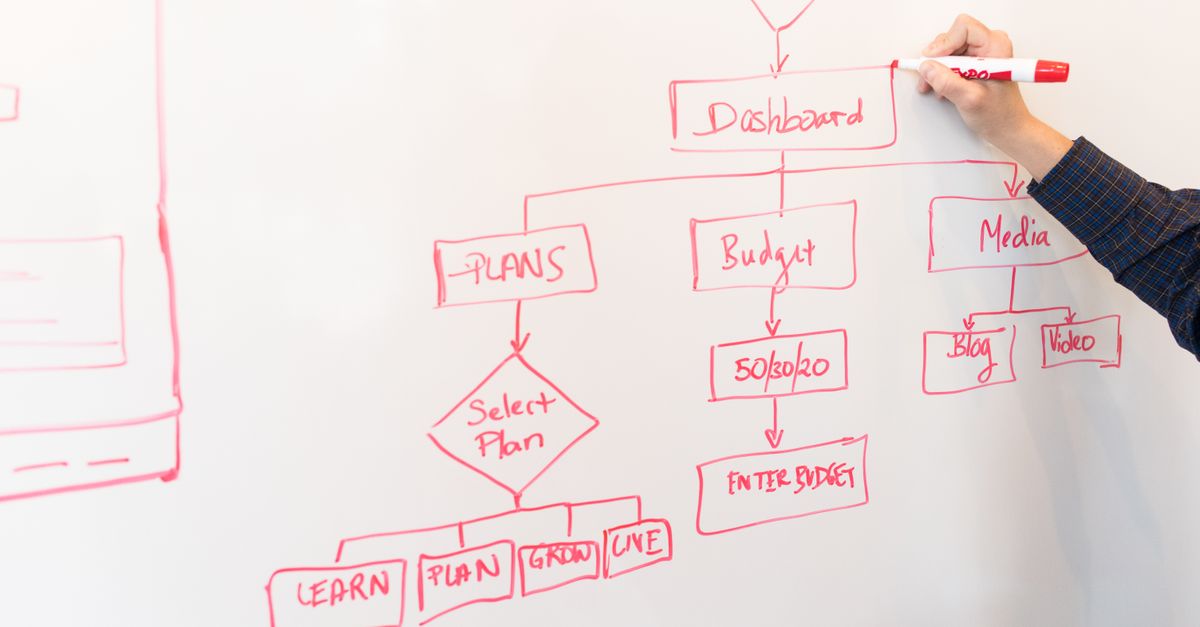
In AgentWorks, you build that pipeline by placing steps on a visual workflow builder and connecting them in the order they should run. Each step is an agent with a job: one gathers sources, the next writes a draft, another checks it, a final one publishes or files the result. The output of each step flows into the next as input, so you define the logic once and reuse it as often as you like. The visual builder is available on the Pro plan and above, alongside scheduled agents and the org knowledge base.
Because every step is a distinct agent, you can pick the right tool for each job rather than forcing one prompt to do everything — the same principle behind our multi-agent pipelines.
A worked example: research → draft → review → publish
Say you produce a weekly market brief. On the canvas that becomes four connected steps:
- Research — an agent runs cited Deep Research and pulls from your connected sources, returning findings with references.
- Draft — a writing agent turns those findings into a structured brief, formatted the way your team expects.
- Review — a checking agent verifies claims against the research output and flags anything unsupported.
- Publish — a final step posts the approved brief to Slack, files it in SharePoint, or exports it as a Word or PDF document.
You wire these together once. From then on the whole chain runs on demand, on a daily, weekly or monthly schedule, or when triggered by an inbound webhook. Each step draws on the tools it needs — web search, cited Deep Research, company knowledge, code execution, or document creation in a live canvas — so a single pipeline can research, reason and produce a finished file end to end.
Grounded in your own knowledge
A pipeline is only as good as what it reads. Any step can query your connected knowledge base, so drafts are built from your documents rather than the model's general recall. You can upload PDF, DOCX, TXT and CSV files, or connect URLs, Notion and Confluence, and the platform retrieves the relevant passages with citations at run time.
This matters most in the research and review steps. Retrieval is grounded, answers are cited back to source, and when something isn't in the knowledge base the agent says "I don't know" rather than inventing an answer — which is exactly the behaviour you want in a review step. You can read more about how this works in knowledge & RAG.
Logging and a risk class for every step
A visual builder isn't only about convenience — it's also where governance lives. Every step in a pipeline is logged, and every step carries a risk classification that reflects what it actually does.
The distinction is practical. A research or draft step reads and generates text — low stakes, and it can run unattended. A publish step changes the outside world: it posts a message, updates a CRM record, or files a document. Those state-changing actions can require human-in-the-loop approval before they execute, so a person signs off on the consequential move while the routine reading and drafting flows without friction.
Everything a pipeline does lands in an immutable, append-only audit trail that you can export as CSV or JSON. When someone asks why a brief said what it said, you can trace it: which sources the research step used, what the draft produced, what the reviewer flagged, and who approved the publish. Per-agent risk classification and human oversight on state-changing actions are part of how AgentWorks is built to help you work toward EU AI Act obligations — noting that whether a given use case is high-risk depends on the use case, not the tool.
Choosing models and controlling cost
Different steps have different needs. A quick classification doesn't need the same model as a long-form draft, and the visual builder doesn't force one choice on the whole chain. Behind the scenes the AUTO router sends each message to the cheapest model capable of handling it, drawing from GPT-5, Claude, Gemini and Mistral — you can review the full line-up on the models page.
Cost stays visible throughout. Tokens are billed at provider cost plus a flat 10% from one transparent euro wallet, and you see live per-run spend as a pipeline executes. Org, team and user budgets let you cap what an automated workflow can consume, so a scheduled job that runs every morning can't quietly run up a bill. The full breakdown of plans and included balance is on the pricing page.
Connecting pipelines to the tools you already use
A pipeline earns its keep when its output lands where work actually happens. The publish step — and any step in between — can reach the tools your team already uses: Slack, Microsoft Teams, Gmail, Google Workspace, Drive, OneDrive and SharePoint for communication and files; Salesforce, HubSpot and Pipedrive for CRM; Notion, Confluence, Jira, Asana and Monday for docs and project tracking; plus GitHub, GitLab and Exact Online.
Beyond the pre-built integrations, you can bring in MCP servers or trigger pipelines through the REST API and inbound webhooks — which is how you connect a canvas built in AgentWorks to a system that lives outside it. Start from any of the 50+ pre-built agents as steps, or build custom agents for the jobs that are specific to your team.
Summary: The visual AI workflow builder lets you chain research, draft, review and publish steps on a no-code canvas. Each step is a logged agent with its own model and risk class, state-changing actions can require human approval, and every run is captured in an exportable audit trail. It's available on Pro and above, and can run on demand, on a schedule, or via webhook.
Frequently asked questions
Do I need to write code to build a pipeline?
No. You build pipelines by placing agent steps on a visual canvas and connecting them in order — no code required. Each step is a configurable agent, and its output flows into the next step as input. The REST API and webhooks are available if you want to trigger a pipeline from an external system, but building the pipeline itself is entirely visual.
How does the risk class per step work?
Every step carries a risk classification based on what it does. Read-and-generate steps like research and drafting are low stakes and can run unattended, while state-changing steps like publishing to a CRM or posting a message can require human-in-the-loop approval before they execute. This keeps routine work fast while putting a person in the loop on consequential actions.
Can pipelines run automatically?
Yes. On Pro and above, pipelines can run on a daily, weekly or monthly schedule, or be triggered by an inbound webhook from another system. Every run is logged to the immutable audit trail, and org, team and user budgets cap how much an automated workflow can spend, so scheduled jobs stay within limits you set.
About the author
AgentWorks Team · AI agents for European teams
AgentWorks is an AI agent platform purpose-built for European teams that need EU AI Act-ready governance, multi-LLM choice across OpenAI, Anthropic, Google and Mistral, and transparent per-token € pricing.
Read more about AgentWorksRelated articles
Read article: Webhook-Triggered AI Agents: React to Real Events  ProductJuly 6, 20266 min read
Webhook-Triggered AI Agents: React to Real Events
Fire an AgentWorks agent pipeline from any inbound event using webhooks and the REST API, with governance and audit built in.
Read more →Read article: AI Agents vs ChatGPT: Why Work Needs More  ProductJuly 6, 20265 min read
AI Agents vs ChatGPT: Why Work Needs More
ChatGPT answers questions. AI agents act on them — with tools, company knowledge, scheduling, approvals, and audit trails. Here's the difference for real business work.
Read more →Read article: AgentWorks vs Relevance AI: EU AI Workforce Compared  ProductJuly 6, 20265 min read
AgentWorks vs Relevance AI: EU AI Workforce Compared
Both platforms build AI teams. See how AgentWorks differs on EU data residency, AUTO model routing, and transparent at-cost token billing.
Read more →